


YouTube Shorts are becoming increasingly popular, attracting millions of views every day. But what if you want to save them for offline viewing? In this guide, App Video Download Free will show you how to download short YouTube videos quickly and for free, with simple tools that work on both phones and computers.
Detailed guide on how to download short YouTube videos
There are many tools available to help you save Shorts, but one of the most effective and trusted solutions is using an online downloader that works seamlessly on both mobile phones and computers.
Here’s a step-by-step guide on how to download short YouTube videos quickly and easily:
- Step 1: Open the YouTube app on your phone, find and select the Shorts video you want to download. Tap the “Share” icon (arrow symbol) right below the video and choose “Copy Link.”
- Step 2: Next, go to TCC & Partners’ free video download website. Paste the link you just copied into the empty field and click “Download” for the tool to analyze and extract the video.
- Step 3: Once processing is complete, you will see different video quality options. Select your preferred quality and click “Download” to save the video to your device.
>>> See more: Can’t download video from Facebook? Easy ways to fix the error
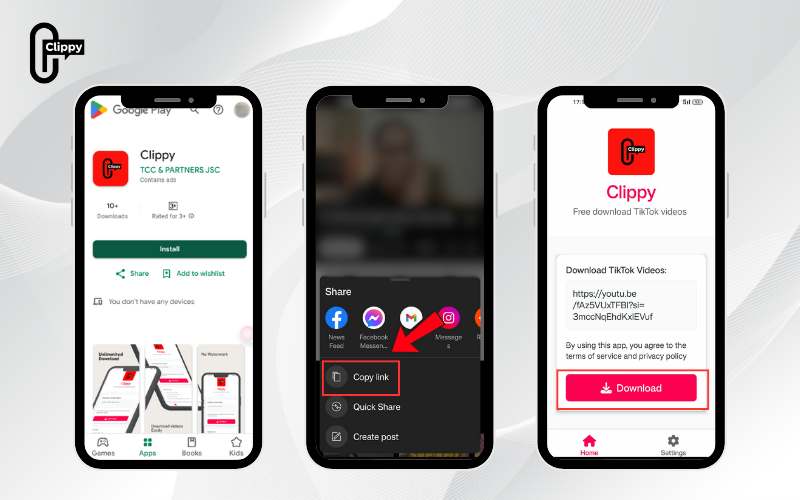
For an even faster and more stable solution, you can use the Clippy app, available on both Google Play and the App Store. Clippy lets you download YouTube Shorts without watermarks, completely free, ad-free, with ultra-fast speed, and full HD quality. It’s the most convenient way to save all your favorite content directly to your phone.

Benefits of downloading YouTube Shorts videos
Downloading YouTube Shorts offers plenty of practical benefits, not just for casual viewers but also for content creators:
- Watch videos offline: The biggest advantage is being able to rewatch your favorite Shorts anytime, anywhere, even without an internet connection. This is especially useful in areas with no Wi-Fi or unstable mobile data.
- Reuse content (for personal purposes): Content creators can download their own Shorts or others’ (with permission) to gather inspiration, reference ideas, or reuse sounds and effects to make new, creative videos.
- Easy sharing: Once saved, videos can be easily shared via messaging apps or other social media platforms without having to send a YouTube link.
- Optimized viewing experience: Downloading helps you avoid disruptive ads and ensures smooth playback with stable image and sound quality, free from network interruptions.
>>> See more: Best app download video from social media platforms
Notes when downloading YouTube Shorts videos to phones and computers
To ensure the process of downloading YouTube Shorts videos is safe and efficient, you need to pay attention to several key points:
Respect copyright
When downloading Shorts, respecting copyright should always be the top priority. Every video on YouTube belongs to its creator, and improper use can lead to legal issues. You should only download Shorts for offline viewing or personal purposes such as learning, research, or entertainment.
Never copy, edit, or re-upload videos without the owner’s consent. This is a serious copyright violation that could result in lawsuits, fines, or account suspension.
If you want a legal option, consider subscribing to YouTube Premium, which allows you to download videos directly from the platform. Following copyright rules not only protects you from risks but also helps maintain a fair and healthy creative community.
Choose a reliable Shorts video download tool
To ensure device safety and video quality, always select a trusted tool for downloading Shorts videos. While there are many apps and websites available, not all are secure.
When using download apps, be cautious if they request unnecessary permissions. This helps protect your personal data and reduces the risk of information theft.
>>> See more: Why some YouTube videos cannot be downloaded? Fix fastly
Check the video format and quality before downloading
Before downloading YouTube Shorts, it’s important to choose the right format and quality to ensure compatibility with your device and purpose of use. Common formats include MP4, WebM (video), and MP3 (audio). Among these, MP4 is the most widely supported, making it ideal for most devices, while MP3 is best suited if you only need the audio.
Follow YouTube’s policies and terms of service
YouTube enforces strict policies to protect both creators and users. When downloading Shorts, you must comply with these rules to avoid legal issues and maintain a safe content environment.
Downloading and re-uploading videos without the creator’s consent, especially for public use or profit, is a violation. This could lead to video removal, account suspension, or even legal consequences.
By following YouTube’s terms, you not only protect yourself from risks but also support creators’ rights and contribute to building a healthier, more sustainable content ecosystem.
>>> See more: How to Download Facebook Videos to Phone Easily
We hope this guide has given you useful tips on how to download short YouTube videos quickly and for free. By choosing the right tools and respecting copyright rules, you can easily save Shorts on both your phone and computer to enjoy anytime.
For the fastest and most convenient option, try the Clippy app free, ad-free, and available on both iOS and Android. With just one tap, you can download YouTube Shorts in HD quality and keep your favorite moments right at your fingertips.
>>> See more: 9+ Easiest ways how to download live videos from Facebook
